
One platform · web & desktop

The complete classroom LMS platform for modern institutes.

iTeach brings students, families, classes, teachers, admissions, fees, and reporting together — so your team spends less time chasing spreadsheets and more time teaching. Built for academies that run classes across cities and time zones.

12+ Modules
24/7 Access
Web + App One login
New leadRuqayyah · AU
11:30 AM · NZ
AttendanceClass marked present
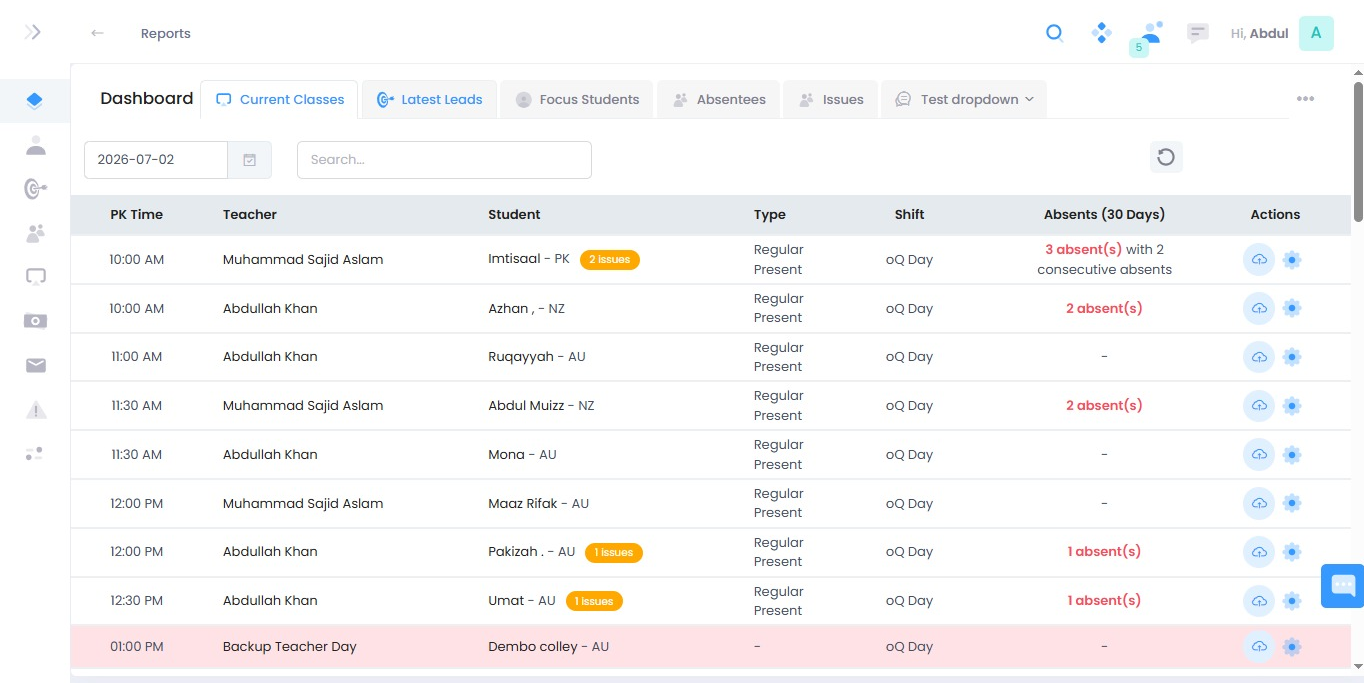
iTeach reports dashboard showing today's classes, teachers, students and attendance

Built for schools · academies · online institutes · training centers

Admissions Classrooms Finance HR Reports

Works with the tools your institute already runs on

Reminders on WhatsApp, fee receipts by email, class links, payments, and exports — iTeach sits on top of the channels your families and teachers already use, so nothing new has to be learned.

Everything your institute needs to run the day

From the first inquiry to the monthly fee report, iTeach keeps the operational work organized, permissioned, and measurable — in one place.

01

One workspace for the whole team

Students, families, classes, teachers, subscriptions, and reports — managed from a single dashboard with role-based access for every staff member.

  • Role-based permissions for admins, teachers & staff
  • Branch and package-aware operations
  • Same data on web and the desktop app
92%
02

Classes & scheduling

Shifts, class routines, teacher assignments, and live classroom workflows — with times that make sense across every student's time zone.

03

Admissions & leads

Capture inquiries, run campaigns, and convert students — with a pipeline every team can see and act on.

04

Accounts & reporting

Track fees, invoices, expenses, salaries, and subscriptions — with reports that are ready when you are.

05

Communication suite

Notifications, email, phone, WhatsApp, notices, and internal messaging — reach families and staff where they already are.

Your schedule, attendance, and follow-ups in one line

Teachers see who's next. Admins see who's absent. Every class, mark, and issue is captured as it happens — no end-of-day catch-up, no lost notes.

Present Needs follow-up Scheduled
10:00 AM
MS Imtisaal PK with Muhammad Sajid Aslam 2 issues
10:00 AM
AK Azhan NZ with Abdullah Khan Present
11:30 AM
MS Abdul Muizz NZ with Muhammad Sajid Aslam Present
12:00 PM
AK Maaz Rifak AU with Abdullah Khan Present

Subscribe to the tools each institute needs.

Start with the core, then add modules as you grow. Every institute runs its own mix.

S

Student

Add this module to extend institute operations inside iTeach.

C

Classes

Add this module to extend institute operations inside iTeach.

C

Courses

Add this module to extend institute operations inside iTeach.

E

Email

Add this module to extend institute operations inside iTeach.

H

HR

Add this module to extend institute operations inside iTeach.

L

Lead

Add this module to extend institute operations inside iTeach.

S

SMS

Add this module to extend institute operations inside iTeach.

A

Accounts

Add this module to extend institute operations inside iTeach.

Package-based onboarding for every institute size.

Packages control which modules are available. Pick the setup that fits today, then expand when you're ready.

Pro
49.00 /mo

Starter plan

  • Student
  • Classes
  • Courses
  • Email
  • HR
Request demo
i

Ready to run your institute on iTeach?

Request a demo and see how modules, permissions, classes, admissions, accounts, and reporting come together for your team.

Guided onboarding Package setup Web & desktop access

Frequently asked questions

Can every institute use a different package?

Yes. Packages define which modules are available, so each institute subscribes to the operational setup that fits — and expands later without switching systems.

Does iTeach work on desktop?

Yes. iTeach runs in the browser and as a desktop app, sharing the same data and login so your team can work whichever way suits them.

Can we add modules later?

Absolutely. Start with core LMS modules and turn on admissions, HR, accounts, communication, and reporting whenever you need them.

Is it built for online academies across time zones?

It is. Classes, shifts, and schedules are designed for students in different countries, so times and attendance stay clear for teachers and admins alike.